
In previous posts, we discussed making quick copies of array and objects without it referencing the original.
We utilize Destructure to access data in arrays and objects as well. Let’s compare the old way of access data and the destructure way in ES6.

The code snippet above demonstrates accessing each property in the object and assign new values into new variables can be tedious if we need to work with a long list of data.
We can use destructuring to pull the data and assign it to a new variable straight away. We do need to watch out for naming the variables though, sometimes variables named somewhere else previously.
For future reference I do think a const {name, handle location } = newSubscriber would be a better fit here.
A QUICK WAY TO RENAME VARIABLES WITH DESTRUCTURE
What if we did not want to use the property name of the object as a new variable ?. Destructure let us change the name right in the curly braces as well. Let’s demonstrate.

Inside the curly braces, the left-hand side of the: represents the property name of the object we want to pull data from and the righthand side of the: represents the name of the new variable we want to create.
USING DESTRUCTURE IN FUNCTION ARGUMENT (…spread)
Let’s say we have an array and we want to pass each of the value in those array into a function argument that is not going to work. Let’s take a look at the code below
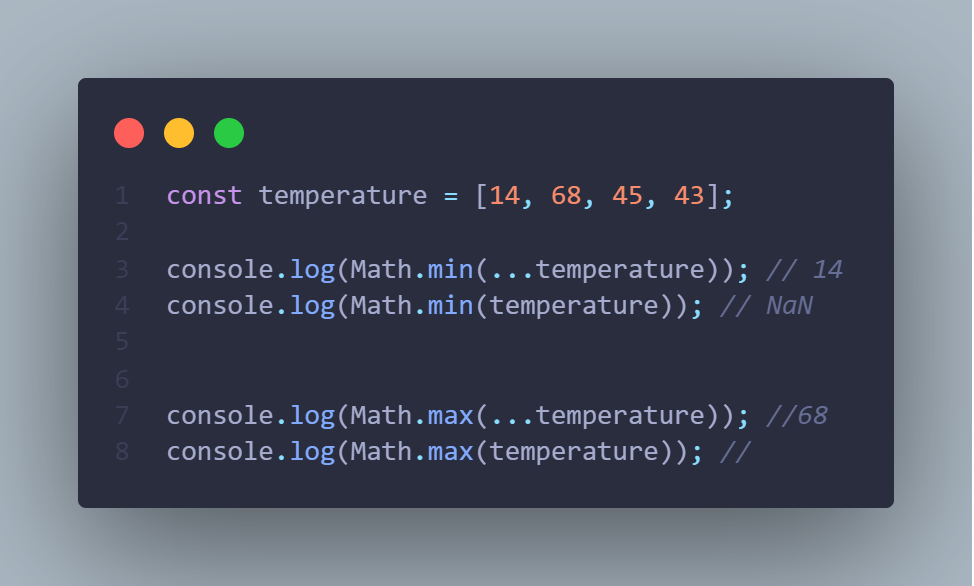
Our attempts at passing in the array directly into the Math.max(), Math.min() function did not work since it does not recognize the array. We can use the spread operator as part of destructuring to spread each actual value of the array into the function argument.
Destructure can be used in many different ways, there are much more complex examples to demonstrate JS destructure. Some of the examples I have used are applied by reading the Mozilla Javascript documentation.
https://developer.mozilla.org/en-US/docs/Web/JavaScript/Reference/Operators/Destructuring_assignment
Until next time.
 Tom's Blog